@ady_soft wrote:
Hello guys,
I try to make this simple project because I have another project ( an irrigation programmer with 4 x relays, 1 x dth 22 , 1 x drop sensor and 1 x moister sensor) connected with node red and I want to migrate to home assistant. This project works very good.
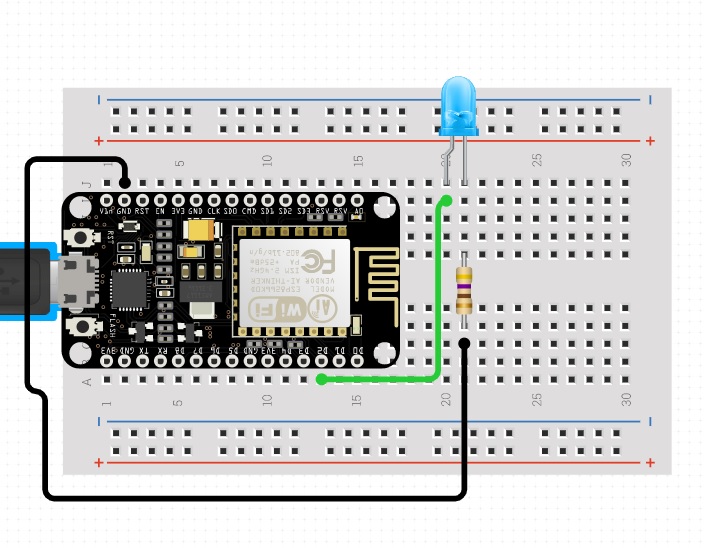
I try from a week to figure out why my new project is not work. I use a ESP8266 NodeMCU the home assistant is installed on a laptop with Ubuntu and I use a docker. The ESP is connected on WiFi, the mqtt broker show me the connection but when I press button on the home automation interface nothing happens. On ESP I connect on the pin D2 a led.
This is the cod from arduino:
#include <ESP8266WiFi.h>
#include <PubSubClient.h>

// Update these with values suitable for your network.
const char* ssid = "Archer";
const char* password = "@test@";
const char* mqtt_server = "192.168.100.149";

WiFiClient espClient;
PubSubClient client(espClient);
int SwitchedPin = D2;
String switch1;
String strTopic;
String strPayload;

void setup_wifi() {
 Serial.begin(115200);
  delay(100);

  // We start by connecting to a WiFi network

  Serial.println();
  Serial.println();
  Serial.print("Connecting to ");
  Serial.println(ssid);

  WiFi.begin(ssid, password);

  while (WiFi.status() != WL_CONNECTED) {
    delay(500);
    Serial.print(".");
  }

  Serial.println("");
  Serial.println("WiFi connected");
  Serial.println("IP address: ");
  Serial.println(WiFi.localIP());
}

void callback(char* topic, byte* payload, unsigned int length) {
  payload[length] = '\0';
  strTopic = String((char*)topic);
  if(strTopic == "ha/switch1")
    {
    switch1 = String((char*)payload);
    if(switch1 == "ON")
      {
        Serial.println("ON");
        Serial.println(strTopic);
        Serial.println(strPayload);
        digitalWrite(SwitchedPin, HIGH);
        client.publish("ha/switch1", "ON");
      }
    else
      {
        Serial.println("OFF");
        digitalWrite(SwitchedPin, LOW);
      }
    }
}


void reconnect() {
  // Loop until we're reconnected
  while (!client.connected()) {
    Serial.print("Attempting MQTT connection...");
    // Attempt to connect
    if (client.connect("arduinoClient")) {
      Serial.println("connected");
      // Once connected, publish an announcement...
      client.subscribe("ha/#");
    } else {
      Serial.print("failed, rc=");
      Serial.print(client.state());
      Serial.println(" try again in 5 seconds");
      // Wait 5 seconds before retrying
      delay(5000);
    }
  }
}

void setup()
{
  setup_wifi();
  client.setServer(mqtt_server, 1883);
  client.setCallback(callback);

  pinMode(SwitchedPin, OUTPUT);
  digitalWrite(SwitchedPin, LOW);
}

void loop()
{
  if (!client.connected()) {
    reconnect();
  }
  client.loop();
}
This is the output from serial:
Connecting to Archer
..........
WiFi connected
IP address:
192.168.100.151
Attempting MQTT connection...connected
This is the configuration yaml:
# Configure a default setup of Home Assistant (frontend, api, etc)
default_config:

# Light
switch:
    - platform: mqtt
      name: "Switch1"
      state_topic: "ha/switch1"
      command_topic: "ha/switch1"
      qos: 0
      payload_on: "ON"
      payload_off: "OFF"
# Uncomment this if you are using SSL/TLS, running in Docker container, etc.
# http:
#   base_url: example.duckdns.org:8123
# MQTT broker
mqtt:
    broker: 192.168.100.149
    port: 1883
# Text to speech
tts:
  - platform: google_translate

group: !include groups.yaml
automation: !include automations.yaml
script: !include scripts.yaml
scene: !include scenes.yaml
This is the configure UI:
entity: switch.switch1
hold_action:
  action: more-info
icon_height: 30px
show_icon: true
show_name: true
tap_action:
  action: toggle
type: button
This is the conf of mqtt:
logins: []
anonymous: true
customize:
  active: false
  folder: mosquitto
certfile: fullchain.pem
keyfile: privkey.pem
require_certificate: false
And this is the mqtt broker logs:
[10:54:23] INFO: Setup mosquitto configuration
[10:54:23] WARNING: SSL not enabled - No valid certs found!
[10:54:23] INFO: No local user available
[10:54:23] INFO: Initialize Hass.io Add-on services
[10:54:23] INFO: Initialize Home Assistant discovery
[10:54:23] INFO: Start Mosquitto daemon
1588924463: mosquitto version 1.6.3 starting
1588924463: Config loaded from /etc/mosquitto.conf.
1588924463: Loading plugin: /usr/share/mosquitto/auth-plug.so
1588924463: |-- *** auth-plug: startup
1588924463:  ├── Username/password checking enabled.
1588924463:  ├── TLS-PSK checking enabled.
1588924463:  └── Extended authentication not enabled.
1588924463: Opening ipv4 listen socket on port 1883.
1588924463: Opening ipv6 listen socket on port 1883.
1588924463: Opening websockets listen socket on port 1884.
1588924463: Warning: Mosquitto should not be run as root/administrator.
1588924465: New connection from 172.30.32.1 on port 1883.
[INFO] found homeassistant on local database
1588924465: New client connected from 172.30.32.1 as auto-7549CD0D-61C7-A608-7AD8-41810E6EF5D4 (p2, c1, k60, u'homeassistant').
1588924467: New connection from 192.168.100.151 on port 1883.
1588924467: New client connected from 192.168.100.151 as arduinoClient (p2, c1, k15).
Thanks for help.

Posts: 1
Participants: 1