Quantcast
Channel: Configuration - Home Assistant Community
Viewing all 114630 articles
Browse latest View live

Custom entity help

$
0
0

Dear Forum

I im having a hard time to get this custom entity working. Just new to HA and no coding experience.

I have made this code and put in my configuration.yaml to create a new entity that tracks daily costs of electricity.

template:

  • sensor:
    • name: “Nydaglig pris”
      unique_id: “dagligpris”
      state: >
      {{ states(‘sensor.elmaler_energy_daily’) * states(‘sensor.energi_data_service’) }}

No error from studio code server, and the sensor show up under entities.
But the data is unavalible for some reason.

Energi data service current electricity price in DKK (Updates hourly) and sensor_elmaler_daily is daily consumtion in kWh.

Please send help.

3 posts - 3 participants

Read full topic


How to access Voice Assist microphone without SSL

$
0
0

I use nginx to access HA locally without SSL (otherwise I get domain issues using duckdns and can’t get into HA). But I can’t use Whisper without SSL:
" Your connection to Home Assistant is not secured using HTTPS. This causes browsers to block Home Assistant from accessing the microphone. Use the Home Assistant app or visit the documentation to learn how to use a secure URL"
Is there no way I can override this? Does the whole voice project require SSL?

2 posts - 2 participants

Read full topic

Automation not getting fired even though sensor values changes

$
0
0

Hello! I have Home Assistant connected to Frigate with MQTT, I have used the Min/Max - Home Assistant integration to sum the value of all the vehicles detected by the cameras.

I have the setup an integration which checks whether this changes from 0 to any value, and sends a notification, here’s the trigger:

trigger: state
entity_id:
  - sensor.veicoli_rilevati
from: "0"

Unfortunately, even though I see the value of this sensor changing in the UI, the automation does not get triggered. Can somebody help me debug this? Thanks.

1 post - 1 participant

Read full topic

What is tts.google_en_com?

$
0
0

I just started playing around with TTS. My system shows tts.google_en_com as a target entity in Developer Tools when I am crafting a Text-to-speech (TTS): Speak action. But when I run the action, nothing happens. If I install the Google Translate integration, I see a new entity, tts.google_translate_en_com, which does work.

What is the purpose of the inoperable target?

1 post - 1 participant

Read full topic

Zwave js ui config db override

$
0
0

Hi, I am trying to implement my Yale YRL210 Lever Lock via zwave. This is the older yale lock with zwave dongle (pre-azure line).

The device has the follwoing IDs:
ManufactureID ProductType-ProductID
0x0129 0x0003-0x0000

however, the ZWave Config DB only has
0x0129 0x0003-0x0409

I installed ZWave JS UI

so I downloaded and modified the config file and added it to my store/config dir, but when I re-interview the device (I tired to restart too), It still shows up as unknown product, what am I doing wrong?

FROM:

{
	"manufacturer": "Yale",
	"manufacturerId": "0x0129",
	"label": "YRL210",
	"description": "Push Button Lever Lock",
	"devices": [
		{
			"productType": "0x0003",
			"productId": "0x0409"
		}
	],

TO:

{
	"manufacturer": "Yale",
	"manufacturerId": "0x0129",
	"label": "YRL210",
	"description": "Push Button Lever Lock",
	"devices": [
		{
			"productType": "0x0003",
			"productId": "0x0409"
		},
		{
			"productType": "0x0003",
			"productId": "0x0000"
		}
	],

Full File Here

I have a PR open with ZWaveJS too, but not sure when it will be merged, so I’d like to test it

1 post - 1 participant

Read full topic

Issue with ILI9488 when using LVGL

$
0
0

Hi,
I’m new to Home Assistant and ESPHome so, please, be patient with me.
I’m trying to connect a ILI9488 display (Amazon.com: Fafeicy LCD Module, TFT Touch Screen Display Serial Peripheral Interface ILI9488 HD 480x320 3.5in (1 PCS) : Industrial & Scientific) to and ESP32-S3-DevKitc-1 N16R8.
When i try the show_test_card = true i correctly have the test image, but when i try to use LVGL I have these strange results

I’ve tried reading other post but with no luck.
Does anyone have an idea of what the problem could be?

Here is my config file which can be definitely optimized:

esphome:
  name: esp32-s3-tft-test
  friendly_name: ESP32-S3-TFT-Test
  platformio_options:
    build_flags: "-DBOARD_HAS_PSRAM"
    board_build.arduino.memory_type: qio_opi
    board_build.flash_mode: dio
  on_boot:
    - light.turn_on:
        id: led_strip
        blue: 100%
        brightness: 60%
        effect: fast pulse
    - delay: 500ms
    - light.turn_off: led_strip


esp32:
  board: esp32-s3-devkitc-1
  framework:
    type: esp-idf
    sdkconfig_options:
      CONFIG_ESP32S3_DEFAULT_CPU_FREQ_240: "y"
      CONFIG_ESP32S3_DATA_CACHE_64KB: "y"
      CONFIG_ESP32S3_DATA_CACHE_LINE_64B: "y"
      CONFIG_AUDIO_BOARD_CUSTOM: "y"
  flash_size: 16MB

psram:
  mode: octal # Please change this to quad for N8R2 and octal for N16R8
  speed: 80MHz 

# Enable Home Assistant API
api:
  encryption:
    key: "******************************"
  on_client_connected:
    then:
      - delay: 50ms
      - light.turn_off: led_strip

# Enable logging
logger:
  level: VERBOSE
  logs:
    ili9xxx: VERBOSE

ota:
  - platform: esphome
    password: "****************************"

wifi:
  ssid: !secret wifi_ssid
  password: !secret wifi_password
  reboot_timeout: 15min  
  # Enable fallback hotspot (captive portal) in case wifi connection fails
  ap:
    ssid: "Esp32-S3"
    password: ""
  power_save_mode: none
  enable_on_boot: True
  fast_connect: On
  output_power: 8.5

captive_portal:


# Define a PWM output on the ESP32
output:
  - platform: ledc
    pin: GPIO47
    id: backlight_pwm

light:
  - platform: esp32_rmt_led_strip
    id: led_strip
    rgb_order: GRB
    pin: GPIO09
    num_leds: 29
    rmt_channel: 1
    chipset: ws2812
    name: "Led Strip"
    effects:
      - pulse:
          name: "Fast Pulse"
          transition_length: 0.5s
          update_interval: 0.5s
          min_brightness: 0%
          max_brightness: 100%
      - addressable_scan:
          name: "Scan Effect With Custom Values"
          move_interval: 5ms
          scan_width: 10
          
  - platform: monochromatic
    output: backlight_pwm
    name: "Display Backlight"
    id: back_light
    restore_mode: ALWAYS_ON  
        
#SPI Configuration for Display
spi:
  clk_pin: GPIO17 # SCK 
  mosi_pin: GPIO21 #SDA (SDI-MOSI)
    
display:
  - platform: ili9xxx
    model: ili9488
    id: ha_display
    dc_pin: GPIO16
    reset_pin: GPIO48
    cs_pin: GPIO5
    invert_colors: true
    auto_clear_enabled: false
    update_interval: never
    rotation: 270
    dimensions: 
      height: 320
      width: 480
      offset_height: 0
      offset_width: 0
    data_rate: 40MHz
  
lvgl:
  

1 post - 1 participant

Read full topic

Moving horizontal panels

$
0
0

Does anyone know if it is possible to move the right panel up to the left profile picture panel?

1 post - 1 participant

Read full topic

Tasmota on Sonoff Zigbee Bridge - Unable to flash zigbee module

$
0
0

I am following the instructions here to flash my Sonoff Zigbee Bridge with Tasmota: Sonoff Zigbee Bridge ZBBridge Zigbee compatibility

Everything goes fine until I get to the part where I flash the zigbee module. I perform the firmware upgrade procedure using the required .ota file (in this case version 6.7.9, though I have tried multiple) but the upgrade gets stuck at “Upload Transfer” and goes no further than this. In the console output I see:

18:22:26.102 UPL: Transfer 192240 bytes
18:22:26.102 UPL: Successful 192240 bytes
18:22:26.114 HTP: Upload transfer

But it gets stuck there and goes no further. I have rebooted and redownloaded the files many times and used different client machines but nothing seems to work. Does anyone know what I am doing wrong?

1 post - 1 participant

Read full topic


RAMSES_RF Integration

$
0
0

I’m using the RAMSES_RF integration with the RAMSES_ESP dongle to get local data from an Evohome system. I got it configured and working well directly connecting the dongle to the Pi4 serial port. Then I tried the remote option using MQTT. The data coming into HA was sporadic and entities were frequently showing as unavailable. The network connection to the router was showing as good on the access point and the 868MHz RF connection to the Evohome hub was unchanged from when I was running the hardwired serial connection. Any ideas what might be wrong?

Thanks.

1 post - 1 participant

Read full topic

Picture-Elements-Card: How to scale State-Badges?

$
0
0

Hello,
I have problems with my floor plan right from the start years ago…
It can be viewed in the preview, on a desktop and on a mobile and all look completely different because of scaling issues.

So far I got images to scale thats fine.
To scale icons I found this:

But I dont use them anymore.
I got text to scale, but that destroys the preview and is ugly.
Now I want to replace my text (temperatures etc.) with state-badges, but they dont scale at all.

Is the a way to get state-badges to scale?

I am really happy about all the new functions and features but I am absolutely puzzled why nobody adresses scaling for 6 years now… there are many posts about this problem but rarely any solutions…

Regards
Martin

1 post - 1 participant

Read full topic

Unable to select text in Web UI

$
0
0

I’ve noticed this recently in various areas, that I am unable to select text in the webUI to copy and paste elsewhere.

For example, I’m debugging a matter issues with IPv6 and if I go under matter and ping device, I cannot select or copy the IPv6 address.

I also had an issue with Homekit with an error on the service and I was unable to select and copy the complete the error message.

Why?.. its extremely fustrating…

1 post - 1 participant

Read full topic

Stumpped need help with mqtt trigger and actions in a blueprint

$
0
0

Help I’m Stumpped.
I’ve read the docs searched the forum but still stumpped
I’m trying to create a blueprint which will run some actions based on mqtt trigger.
Below is the bottom part of blueprint.
How do I pass the result of the trigger payload to the action block.

I know the device works and if I listen to the mqtt it does pass the “on”, “off”, etc.


’ mode: restart
max_exceeded: silent
trigger_variables:
base_topic: !input base_topic
controller: !input controller
trigger:

  • platform: mqtt
    topic: ‘{{ base_topic ~ ‘’/’’ ~ controller ~ ‘’/action’’ }}’
    action:
  • variables:
    command: ‘{{ trigger.topic }}’ <---- This is probably wrong
  • choose:
    • conditions:
      • ‘{{ command == “on” }}’
        sequence: !input button_on
    • conditions:
      • ‘{{ command == “off” }}’
        sequence: !input button_off
    • conditions:
      • ‘{{ command == “brightness_move_up” }}’
        sequence: !input button_on_long_press
    • conditions:
      • ‘{{ command == “brightness_move_down” }}’
        sequence: !input button_off_long_press
    • conditions:
      • ‘{{ command == “brightness_stop” }}’
        sequence: !input button_long_press_stop

1 post - 1 participant

Read full topic

Zemismart Switch Backlight Strength

$
0
0

Hi,

I have multiple physical zemismart zigbee smart switches.
I’m trying to increase the brightness of their led indicator, how can I make that work?

1 post - 1 participant

Read full topic

Status of Switch Manager

$
0
0

I’m new here, so please forgive any faux pas.

I have been using a plug in named “Switch Manager” to manage buttons and switches. I find it really helpful.

Currently it’s quit working (it says all actions are “Unknown”. I figured I needed to update it and went to Github for it where i found the following:

“The device sequence action is currently unsupported, use service/action calls instead as this should be used thoughout Home Assistant anyway. You can literally do everything device actions can do and more just by using the standard actions. You can read more on why you shoudn’t use it [here]”

Yet the project seems to be under active maintenance (last commit 2 weeks ago).

Should I stop using Switch Manager, or do I misunderstand the comment? I am not familiar with “the device sequence actions”.

Link to Github page

1 post - 1 participant

Read full topic

Mushroom climate card does not show Heating on or off

$
0
0

Hi, I am trying to solve next problem so help is appreciated.
I created a dashboard with multiple mushroom climate cards.
When clicking on a card, more info is shown. They all seem to be the same but one reacts differently and i can not find why.

Here is the code for the dashboard

 square: false
type: grid
cards:
  - type: custom:mushroom-climate-card
    entity: climate.woonkamer
    fill_container: true
    show_temperature_control: false
    tap_action:
      action: more-info
    icon: mdi:heat-wave
    layout: vertical
    hold_action:
      action: more-info
    hvac_modes: []
  - type: custom:mushroom-climate-card
    entity: climate.keuken
    layout: vertical
    icon: mdi:heat-wave
    fill_container: true
    tap_action:
      action: more-info
    hold_action:
      action: more-info
  - type: custom:mushroom-climate-card
    entity: climate.badkamer
    fill_container: true
    icon: mdi:heat-wave
    layout: vertical
    tap_action:
      action: more-info
    hold_action:
      action: more-info
  - type: custom:mushroom-climate-card
    entity: climate.kamer_nikki
    icon: mdi:heat-wave
    fill_container: true
    layout: vertical
    tap_action:
      action: more-info
    hold_action:
      action: more-info
  - type: custom:mushroom-climate-card
    entity: climate.kamer_tim
    fill_container: true
    icon: mdi:heat-wave
    layout: vertical
    tap_action:
      action: more-info
    hold_action:
      action: more-info
  - type: custom:mushroom-climate-card
    entity: climate.chill_kamer
    fill_container: true
    icon: mdi:heat-wave
    layout: vertical
    tap_action:
      action: more-info
    hold_action:
      action: more-info
  - type: custom:mushroom-climate-card
    entity: climate.hobbykamer
    fill_container: true
    icon: mdi:heat-wave
    layout: vertical
    tap_action:
      action: more-info
    hold_action:
      action: more-info
columns: 2

So only climate.kamer_nikki reacts differently.
When i click on the tile the ‘more info’ detail is shown. If i now click on the history button only actual temp and target temp are shown. On all the others also the heating on/of is shown.
I can’t see a difference and can not figure out how the change so also the heater is shown in the Climate.kamer_nikki history tab.
I created the tile again but same story.

Is there any other information that i can provide to help me out?
I’m getting my temp information from the Tado climate control system.

marc

1 post - 1 participant

Read full topic


Grouping Two Sensors for Total Consumption

$
0
0

I have two sensors that measure power draw for two different loads—in this case, both cat beds. Both sensors offer up a consumption for today. I’m using a group helper to combine the two consumptions by summing them. The result looks correct, as do the charts when I view the values in the History tab of HA. However, when I look at the energy tab in HA I see a very large spike from 12am-1am for the grouped cat bed consumptions. What am I doing wrong? I’ll not that this isn’t an anomaly, as it’s occurred every day since I setup the grouped sensor.


1 post - 1 participant

Read full topic

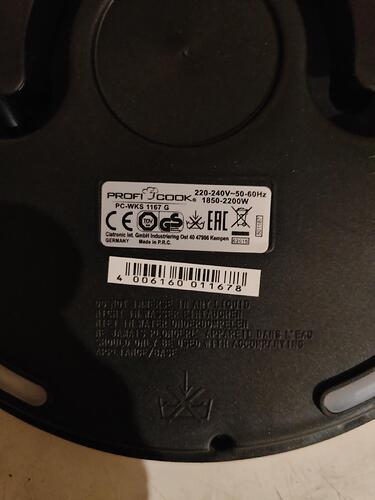
I can't integrate the Profi Cook PC-WKS 1167 G kettle with tasmota

$
0
0

I can’t integrate the Profi Cook PC-WKS 1167 G kettle with tasmota. MAC address 1c:90:ff:03:f6:81 Main module v2.6.3 I see that this product has a tasmota and esphome documentation page

The kettle works in the Tyua app. I want to flash this kettle with Tasmota or ESPHome to connect directly to Home Assistant (not through the Tyua cloud)

When I run the tyua cloud converter script I get this


1 post - 1 participant

Read full topic

My Google TTS not working

$
0
0

I had to change my Home Assistant IP address from 192.168.0.13 to 192.168.0.20. Now tts google doesn’t work. My log shows that the google TTS is requesting info from 192.168.0.13 which is why I think this is broke. BTW I use HA cloud for google voice support.

Is there a way to tell google to use 192.168.0.20 instead??

Thanks.

1 post - 1 participant

Read full topic

Moving from payload_templates to payload breaks expression

$
0
0

Hi, can’t seem to get this right. This works

tap_action:
  action: call-service
  service: mqtt.publish
  data:
    topic: command/set/audio
    payload_template: |-
      { "area": "living", "action": "mute",
        "state": {% if is_state("input_boolean.living_mute", "on") %} true {% else %} false {% endif %}
      } 
    retain: false
  target: {}

but using payload_templates breaks it. The expression doesn’t get evaluated and is sent as an entire string. Trying to migrate away from payload_template as it is being deprecated.

Thanks for your help in advance.

1 post - 1 participant

Read full topic

Http request logging

$
0
0

How do I configure, or find http logs for all requests?

I assume that somehow there is a way to get a fairly standard http request log: every request, the src ip, the requested resource, the outcome, etc. Is this correct?

I’m trying:

logger:
default: warning
logs:
homeassistant.components.http: debug

And I do see things like:

2024-12-08 13:17:42.938 DEBUG (MainThread) [homeassistant.components.http.auth] Authenticated 172.30.32.2 for /api/core/state using bearer token

I never see anything else, and certainly not more basic requests for image files I have for use in dashboards (which do get served properly). Am I using the right component?

1 post - 1 participant

Read full topic

Viewing all 114630 articles
Browse latest View live